Selasa, 04 Agustus 2015

sekitar 18% Pengguna Android Hijrah ke Lollipop

18% Pengguna Android Hijrah ke Lollipop
Jakarta - Sembilan bulan sejak diluncurkan, tingkat adopsi Android Lollipop terus mengalami peningkatan. Dalam statistik yang baru saja dirilis Google, sebanyak 18% pengguna perangkat Android tercatat telah hijrah ke Lollipop.

Angka migrasi tersebut naik 12,4% dari bulan Juni. Sementara KitKat sendiri masih yang mendominasi perangkat Android seluruh dunia. Jumlahnya mencapai 39,3%. Naik sedikit dari bulan Juni yakni sebesar 39,2%.

Di sisi lain, Jelly Bean terus mengalami penurunan. Penggunanya tergerus dari 37,4% menjadi 33,6%. Tentu saja yang tidak bisa dilupakan Ice Cream Sandwich dimana pengadopsinya tinggal 4,1%, sedangkan Gingerbread 4,6%.

Android Froyo rupanya hingga saat ini masih ada yang menggunakan. Tapi angkanya kian kecil. Hingga Agustus ini, tercatat pengguna Froyo tinggal tersisa 0,3% saja.


Seperti detikINET kutip dari Android Community, Selasa (4/8/2015), perilisan statistik adopsi Android ini dimaksudkan untuk menjadi panduan pengembang. Sehingga memudahkan mereka menentukan platform mana yang akan lebih ditargetkan.

Selain itu, statistik ini dijadikan gambaran fragmentasi adopsi Android bagi vendor ponsel. Meskipun fragmentasi bukan lagi hal yang terpenting saat ini. Tapi diharapkan vendor segera merilis update Android terbaru guna menambal celah keamanan, salah satunya Stagefright.
Baca selengkapnya - sekitar 18% Pengguna Android Hijrah ke Lollipop

Inilah tampilan Jelas Xperia Z5

Begini Tampang Jelas Xperia Z5 


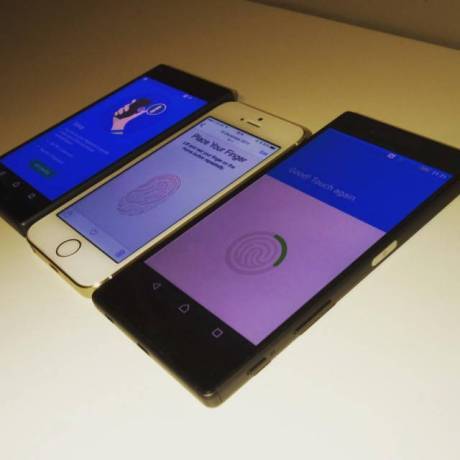
Jakarta - Bisa jadi pengembangan Xperia Z5 yang digadang-gadang sebagai penerus Xperia Z3+ atau Xperia Z4 sudah dalam tahap akhir. Buktinya penampakan calon ponsel andalan Sony itu sudah mulai beredar di internet. Seperti apa?

Sekilas bentuknya tampak tak jauh berbeda dengan Xperia Z4. Hanya saja mungkin karena masih prototipe, balutan warnanya yang cuma hitam dof. Akibatnya, Xperia Z5 jadi tak kelihatan elegan layaknya ponsel kelas atas. Pun demikian, sepertinya versi finalnya nanti bakal menyodorkan pilihan warna-warna yang lebih berkelas layaknya Xperia Z4.

Xperia Z5 bukan satu-satunya kejutan yang hadir kali ini, di sisi lain penampakannya juga terlihat ponsel mirip Xperia Z5 namun dengan ukuran yang lebih kecil. Rumor menyebut ponsel ini adalah Xperia Z5 Compact, warna yang diusungnya juga sama yakni hitam dof. Kedua ponsel kelihatannya memang masih dalam tahap finalisasi.

Tak cuma itu, hal menarik lainnya yang terungkap dari penampakan Xperia Z5 adalah kepastian dibenamkannya pemindai sidik jari. Hal itu kelihatan di layar Xperia Z5 yang tampilannya menunjukkan bahwa fitur keamanan berbasis biometrik itu baru saja dijajal.

Tapi belum ketahuan dimana posisi pemindai siik jarinya berada, dibenamkan bersamaan dengan home button seperti iPhone atau diletakkan di bagian belakang.

Soal spesifikasi, bila merujuk dari isu yang sebelumnya beredar dikatakan Xperia Z5 akan memiliki jeroan yang sama persis dengan Xperia Z4, mulai dari penggunaan prosesor Snapdragon 810, RAM 3 GB, dan kamera 20,7 MP. Perbedaan signifikan terletak di bagian layarnya yang sedikit melebar jadi 5,5 inch dan kamera depan yang kabarnya jadi 8 MP.

Xperia Z5 juga disebut hanya menyodorkan satu pilihan kapasitas memori internal, yakni sebesar 32 GB.

Waktu peluncuran ponsel ini juga sudah sempat dibeberkan sendiri oleh Sony, meski tak terang-terangan menyebut peluncuran Xperia Z5. Pastinya sebuah acara bakal digelar oleh Sony pada 2 September nanti, yang juga diprediksi bakal digelar bersamaan dengan ajang IFA 2015 di Berlin, Jerman.
Baca selengkapnya - Inilah tampilan Jelas Xperia Z5

Bocoran Samsung untuk Galaxy Note 5

Arah peluncuran Galaxy Note 5 makin jelas, hal itu dibeberkan sendiri oleh Samsung melalui undangan terbarunya yang sudah mulai disebar ke beberapa media. ‘Note’, demikian ungkapan Samsung guna menekankan pada sebuah acara di 13 Agustus.

Meski masih harus dibuktikan pada saatnya nanti, ungkapan ‘Note’ sangat mengacu pada seri phablet Galaxy Note kepunyaan Samsung. Apalagi di undangan terbaru yang disebar Samsung ilustrasinya juga mengarah pada seri phablet tersebut, kelihatan dari tonjolan di kiri bawah yang kemungkinan adalah stylus.

Galaxy Note 5, adalah phablet yang disebut-sebut akan dirilis ponsel di 13 Agustus nanti. Ponsel ini menjanjikan sejumlah peningkatan signifikan di sektor jeroan. Prosesornya disebut akan memakai octa core 64 bit Exynos 7422 dan RAM 4 GB. Begitu juga bagian stylus-nya yang kabarnya akan menyodorkan improvisasi anyar.

Adapun layarnya dibilang berukuran 5,7 inch dengan resolusi QHD (2560x1440 pixel) dan kamera 16 MP. Namun seperti Galaxy S6, Samsung disebut juga meniadakan kehadiran slot micro SD. Hal tersebut merupakan imbas dari penggunaan bodi metal yang dikemas desain unibody.

Tapi Galaxy Note 5 bukan satu-satunya ponsel yang akan dirilis ponsel Samsung di acara tersebut. Disebutkan Samsung juga akan meluncurkan dari versi jumbo dari Galaxy S6 Edge dengan sebutan Galaxy S6 Edge+. Secara spesifikasi Galaxy S6 Edge+ tidak berbeda dengan Galaxy Note 5, yang mencolok hanya di penggunaan layar berteknologi Edge dan absen kehadiran stylus.
Baca selengkapnya - Bocoran Samsung untuk Galaxy Note 5

Kamis, 02 Februari 2012

Sepeda Motor Injeksi Irit Harga Terbaik Cuma Honda

Sepeda Motor Injeksi Irit Harga Terbaik Cuma Honda - Kali ini Honda Indonesia mengleuarkan produk New Supra X 125 R. Dengan mengusung slogan "Rajanya motor bebek", New Supra X 125 R memang terlihat lebih elegan. Ditambah lagi dengan banyak nya pilihan warna yang dapat dipilih. Honda New Supra X 125 R memiliki fitur-fitur yang sangat luar biasa, diantaranya:
Sepeda Motor Injeksi Irit Harga Terbaik Cuma Honda

1. Mesin dengan PGM-FI Engine
Mesin Fuel Injection 125cc, 4 tak, SOHC berpendingin udara. Pelopor mesin sepeda motor injeksi di Indonesia.

2. Lampu Depan Sporty
Dilengkapi sporty visor. Tampil keren, trendi, bergaya moge. Jangkauan cahaya lebih luas dan terang, lebih nyaman saat berkendara, mudah dilihat oleh pengendara lain.

3. Lampu sein dan senja Elegan
Lampu sein depan dan senja menyatu, dilengkapi multireflektor. Tampil elegan, tampak seperti mobil mewah Eropa.

4. Sayap samping Sporty
Sayap model tiga dimensi yang menyatu dengan body, dikombinasikan dengan dua warna.


5. Knalpot Racing
Model mantap, seperti motor balap. Menunjang tampilan sepeda motor yang semakin sporty.

6. Rem Cakram Depan & Belakang Type PGM-FI
Lebih pakem dan bergaya. Untuk pengereman yang lebih baik.

7. Pengaman kunci kontak bermagnet
Sistem penguncian bermagnet yang kuat dan nyaman untuk menghindari resiko pencurian.


Add Logo Honda PGM-FI SEO Competition


Sepeda Motor Injeksi Irit Harga Terbaik Cuma Honda - Dengan kecanggihan yang ditanamkan Honda pada sepeda motor ini, sudah sangat wajar rasanya jika Honda New Supra X 125 R menyandang gelar "Rajanya Motor Bebek"

Sudah banyak produk Sepeda Motor Injeksi Irit Harga Terbaik Cuma Honda yang sudah dikeluaran oleh Astra Honda Motor,
Baca selengkapnya - Sepeda Motor Injeksi Irit Harga Terbaik Cuma Honda

Rabu, 21 Desember 2011

Ultrabook Notebook Tipis Harga Murah Terbaik

Info Kontes SEO terbaru dengan keyword :
Ultrabook Notebook Tipis Harga Murah Terbaik
Baca selengkapnya - Ultrabook Notebook Tipis Harga Murah Terbaik

Rabu, 23 November 2011

SERIBU PERNAK PERNIK PONSEL ANDROID

SERIBU PERNAK PERNIK PONSEL ANDROID - ANDROID sekarang ini menjadi trend baru di dunia teknologi Smartphone. ANDROID adalah salah satu sistem operasi buat HP atau Handphone, Jika kita beberapa tahun tahun lalu sudah mengenal dengan Simbyan dan Java sebagai Sistem operasi dari Handphone sekarang ini sistem operasi terbaru yang digunakan Handphone adalah ANDROID.

SERIBU PERNAK PERNIK PONSEL ANDROID

Perkembangannya yang sangat pesat, ANDROID mampu menjadi Trend center dari Produk Smartphone. Perusahaan-perusahaan ponsel ternama pun saling berjibaku dan berlomba memperebutkan pasar handphone cerdas khususnya ponsel Android di Indonesia. Seperti Samsung, Sony Ericsson, Motorola, LG dan masih banyak lagi vendor-vendor yang menggunakan Sistem Operasi ANDROID. Bahkan ada beberapa Merk China juga memakai Sistem ANDROID ini. Hasilnya, konsumen juga diuntungkan karena Ponsel berbasis Android yang sebelumnya mahal, kini semakin terjangkau.

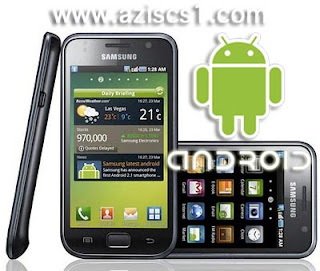
SERIBU PERNAK PERNIK PONSEL ANDROIDSalah satu Ponsel berbasis Android

Seiring berkembang pesatnya Ponsel berbasis ANDROID ini, Banyak para pengguna Android yang berburu Aksesoris Android, Software Android , Aplikasi Android, Thema Android dan pokoknya semua yang berhubungan dengan ANDROID.

Untuk memfasilitasi dan agar pengguna Android lebih mudah mendapatkan Semua hal yang berhubungan dengan Android. Maka Android Softmarket Membuat Sebuah Kontes SEO yang bertema SERIBU PERNAK PERNIK PONSEL ANDROID yang mana nantinya setelah Kontes ini berakhir akan diadakan Opening www.android-softmarket.com Jadi Bagi Para Pengguna ANDROID yang ingin mendapat Aksesoris Android, Software Android , Aplikasi Android, Thema Android dan pokoknya semua yang berhubungan dengan ANDROID.
Kalian bisa langsung membuka web tersebut.

"SERIBU PERNAK PERNIK PONSEL ANDROID"
Baca selengkapnya - SERIBU PERNAK PERNIK PONSEL ANDROID

Kamis, 22 September 2011

Blogger Banua Menuju Blogger Nusantara 2011

Blogger Banua Menuju Blogger Nusantara 2011Blogger Banua Menuju Blogger Nusantara 2011

Menjadi seorang Blogger adalah menjadi kebanggaan tersendiri bagiku. Dengan melakukan aktivitas ngeblog kita dapat berbagi pengalaman, karya dan juga pengetahuan kepada semua orang. Selain tempat berbagi pengetahuan dengan Blog kita juga dapat mendapatkan penghasilan. Sekarang ini Di Indonesia Para Para Blogger sudah mencapai Jutaan jumlah, Masing masing dari mareka membentuk Grup, kelompok atau komunitas Blogger. Biasanya Grup atau komunitas ini biasanya terbentuk atas kesamaan daerah Tempat tinggal yang mencakup Provinsi. salah satu Komunitas Blogger yang ada saat ini adalah BLOGGER BANUA. Blogger Banua ini adalah Salah satu tempat berkumpulnya Para Blogger Di Kalimantan Selatan. Berawal dari sebuah Grup di Facebook dan Grup ini berkembang menjadi sebuah komunitas Blogger dan setidaknya dapat mengumpulkan Blogger yang ada di Kalimatan Selatan. Blogger Banua sudah beberapa kali mengadakan KOPDAR dan Anggotanya pun sudah sekitar 200 orang yang semuanya tersebar di seluruh KalSel.

Baru baru ini salah satu komunitas Blogger Se Indonesia atau BLOGGER NUSANTARA berencana Melakukan KOPDAR 1000 Blogger, Mareka akan mengumpulkan blogger dalam satu even besar dan bermafaat merupakan mimpi menarik untuk diwujudkan, Even besar karena rencananya akan ada 1000-an blogger yang akan berkumpul dari seluruh Nusantara. Tak sekadar pesta tapi lebih pada silaturrahim antar sesama blogger yang berujung pada kemakmuran bersama membawa blogger indonesia ke arah yang lebih bermartabat dengan muatan sharing edukasi yang tinggi.

Acara KOPDAR 1000 Blogger ini juga kemungkinan akan diikuti oleh beberapa dari anggota BLOGGER BANUA. Berawal dari Rencana inilah maka di adakannya Kontes SEO ala Blogger Banua dengan Tema Blogger Banua Menuju Blogger Nusantara 2011 , Tujuan utamanya adalah untuk Memajukan dan memperkenalkan Blogger Kalimantan Selatan di tingkat Nasional.

Maju terus BLOGGER BANUA Tunjukkan kemampuan dan kreatifitas Kalian Di Tingkat Nasional. Ayo Dukung Blogger Banua Menuju Blogger Nusantara 2011 .
Baca selengkapnya - Blogger Banua Menuju Blogger Nusantara 2011

Sabtu, 06 Agustus 2011

Juara 1 Lomba Blog Di banjarmasin

Alhamdulillah ku ucapkan puji syukur kepada Allah SWT karena Blogku ini " a-zteknologi.blogspot.com " menjadi juara 1 lomba Blog BANUA BAZAR KOMPUTER with TELKOM SPEEDY. Terimakasih juga buat teman teman Blogger yang telah ikut berpartisipasi baik itu dengan memfollow blog ini atau memberikan komentar pada blog ini. Sebenarnya aku tidak mengira blogku ini akan menjadi juara pertama ( berharapa sih ada ) karena ini adalah pengalaman pertamaku ikut Lomba Blog, sebelumnya aku tidak pernah mengikuti Lomba Blog. Informasi Lomba ini pun aku dapat dari temanku dia yang mengajak aku ikut Lomba Blog BANUA BAZAR KOMPUTER with TELKOM SPEEDY dan akhirnya aku ikut mendaftar dan menjadi juara.

Berikut hasil dari Lomba Blog BANUA BAZAR KOMPUTER with TELKOM SPEEDY 2011 di Banjarmasin :


  1. Juara 1 Blogku http://a-zteknologi.blogspot.com/
  2. Juara 2 Arif : http://itbanua.blogspot.com/
  3. Juara 3 Ayead : http://tergaptek.blogspot.com/
Kebahagianku selain mendapatkan Hadiah karena jadi pemenang pada lomba Blog ini, saya juga senang karena aku dapat bertemu langsung dengan teman temanku di dunia maya yang sebelumnya aku tidak pernah bertemu mareka langsung. ohya selain Arif dan Ayead yang kutemui disana ada juga temanku Adittya dan TuanMudaKalsel (entahlah aku kurang tahu nama aslinya). Thanks teman teman semua Walaupun Kalian belum juara teruslah tetap berusaha dan berkarya suatu saat nanti pasti kalian akan menjadi juara.


Oh ya Teman teman Bagaimana rencana kita untuk membentuk komunitas Blogger Banjarmasin ?

NB : Thanks buat Arif atas fotonya
Baca selengkapnya - Juara 1 Lomba Blog Di banjarmasin

Rabu, 20 Juli 2011

Nokia 500 fate, Smartphone Nokia Newest


A month after nokia known in the middle of preparing 4 handphones symbian new. nokia 500 fate appear in a advertisement as handset symbian that has spesification powerful.

This official picture is leak from advertisement leaflet that distributed just recently, this handphone will run prosesor 1ghz, camera 5mp, os symbian belle newest and has cover that can flit with colour differ that is red, black and blue with sure support wifi.

Nokia 500 fate handphone with bottommost spesification between handphone nokia newest that leak in roadmap latest like 701 helen, 700 zeta, 600 cindy. till now will still there is no information will hit launching official date will along with price that membanderolnya.
Baca selengkapnya - Nokia 500 fate, Smartphone Nokia Newest

Rabu, 30 Maret 2011

Download Gratis mozilla firefox 4

Beberapa waktui lalu mozilla firefox 4 resmi diluncurkan.

Keunggulan mozilla firefox 4:
  1. »Tampilan baru
  2. »Fitur baru yang keren
  3. »6x lebih cepat dari Firefox 3.6

Untuk kecepatan akses web, firefox terbaru ini diklaim 6 kali lebih cepat dibanding versi sebelumnya (firefox 3.6).

Selain itu, untuk masalah crash di salah satu halaman tidak akan berpengaruh di halaman lainnya.

Saat ini saya sudah menginstall firefox 4 di komputer. Pengalaman pertama saat mencoba, yang jelas terasa adalah akses terasa lebih cepat dan ringan. Sejauh ini masih belum menemukan kendala dalam memakainya.

silahkan ikuti tautan berikut ini untuk mulai mengunduhnya gratis.

Download firefox 4 (bahasa inggris)
Download firefox 4 (bahasa indonesia)
Baca selengkapnya - Download Gratis mozilla firefox 4

Rabu, 16 Maret 2011

Speed Up Internet Connection

Windows 2k/XP

1. First, open the Windows Registry using Regedit, and (after backing up) navigate to: HKEY_LOCAL_MACHINE\SYSTEM\CurrentControlSet\Services\Tcpip\ServiceProvider
2. Note the following lines (all hex dwords): Class = 008 ( biggrin.gif - indicates that TCP/IP is a name service provider, don't change
LocalPriority = 1f3 (499) - local names cache
HostsPriority = 1f4 (500) - the HOSTS file
DnsPriority = 7d0 (2000) - DNS
NetbtPriority = 7d1 (2001) - NetBT name-resolution, including WINS
3. What we're aiming to do is increase the priority of the last 4 settings, while keeping their order. The valid range is from -32768 to +32767 and lower numbers mean higher priority compared to other services. What we're aiming at is lower numbers without going to extremes, something like what's shown below should work well:
4. Change the "Priority" lines to:
LocalPriority = 005 (5) - local names cache
HostsPriority = 006 (6) - the HOSTS file
DnsPriority = 007 (7) - DNS
NetbtPriority = 008 ( biggrin.gif - NetBT name-resolution, including WINS
5. Reboot for changes to take effect

2. Windows 9x/ME


1. The tweak is essentialy the same as in Windows 2000/XP, just the location in the Registry is slightly different. For a more detailed description see the Windows 2000/XP section above
2. Open the Windows Registry using Regedit, and (after backing up) navigate to:
HKEY_LOCAL_MACHINE\System\CurrentControlSet\Services\VxD\MSTCP\ServiceProvider
3. You should see the following settings:
Class=hex:08,00,00,00
LocalPriority=hex:f3,01,00,00
HostsPriority=hex:f4,01,00,00
DnsPriority=hex:d0,07,00,00
NetbtPriority=hex:d1,07,00,00
4. The "priority" lines should be changed to:
LocalPriority=hex:05,00,00,00
HostsPriority=hex:06,00,00,00
DnsPriority=hex:07,00,00,00
NetbtPriority=hex:08,00,00,00
5. Reboot for changes to take effect

3. System.ini IRQ Tweak - Windows 9x/ME ONLY

1. Find your Network Card's IRQ

  1. In order to add the entry to your System.ini file, you'd first have to find your NIC's IRQ
  2. Right-click on My Computer icon on your Desktop, then left-click on Properties (a shortcut for that would be to press the 'Windows' + 'Pause' keys). Navigate to Device Manager and double-click on Computer. Under "View Resources" you will find a list of IRQs, each with description of the device that's using it. Note the IRQ number used by your Network Adapter

2. Adding the entry to System.ini

  1. Once you've found the IRQ of your Network Card, you need to reserve some RAM for its use, by adding an entry to the System.ini file. You can edit the file in any text editor, however the easiest way is to use Windows' built in "System Configuration Editor"
  2. Navigate to Start > Run and type sysedit . Find the [386enh] Section in the System.ini file and add Irq[n]=4096 under it, where [n] is the IRQ number of your NIC and 4096 is the amount of RAM you want to reserve in Kbytes. We recommend using 4096, however you can experiment with different values if you want. Save changes in the file, exit and reboot for changes to take effect.
  3. Note: If you choose to try different values, keep in mind that reserving too much RAM for your NIC will decrease the amount of RAM available for applications, while reserving too little might not give the desired effect

3. Additional Thoughts
  1. The only negative effect of the System.ini IRQ tweak is that it will reduce the amount of RAM available for running applications a bit, by reserving some specifically for your Network Card's use. The gain in performance usually outweighs the negative effect by far, considering any Computer with 32Mb of RAM or more
  2. This tweak may or may not work for you. It is not a documented tweak by Windows
  3. Keep in mind that if you add hardware to your system the IRQ of the Network Adapter might change, in which case you will need to modify the setting in System.ini
  4. In systems with multiple NICs, you might want to add the setting for both IRQs. Also, you could reserve RAM for other IRQs if you wish, just use common sense and don't forget it reduces the amount of RAM available for running applications
  5. If you are using an USB device, it does not have a specific IRQ, however you can try adding the entry using the IRQ of the USB Controller
Baca selengkapnya - Speed Up Internet Connection

Minggu, 13 Maret 2011

Best Keyboard Shortcuts

Getting used to using your keyboard exclusively and leaving your mouse behind will make you much more efficient at performing any task on any Windows system. I use the following keyboard shortcuts every day:

Windows key + R = Run menu

  • This is usually followed by:
  • cmd = Command Prompt
  • iexplore + "web address" = Internet Explorer
  • compmgmt.msc = Computer Management
  • dhcpmgmt.msc = DHCP Management
  • dnsmgmt.msc = DNS Management
  • services.msc = Services
  • eventvwr = Event Viewer
  • dsa.msc = Active Directory Users and Computers
  • dssite.msc = Active Directory Sites and Services
  • Windows key + E = Explorer

  1. ALT + Tab = Switch between windows
  2. ALT, Space, X = Maximize window
  3. CTRL + Shift + Esc = Task Manager
  4. Windows key + Break = System properties
  5. Windows key + F = Search
  6. Windows key + D = Hide/Display all windows
  7. CTRL + C = copy
  8. CTRL + X = cut
  9. CTRL + V = paste

Also don't forget about the "Right-click" key next to the right Windows key on your keyboard. Using the arrows and that key can get just about anything done once you've opened up any program.


Keyboard Shortcuts

  • [Alt] and [Esc] Switch between running applications
  • [Alt] and letter Select menu item by underlined letter
  • [Ctrl] and [Esc] Open Program Menu
  • [Ctrl] and [F4] Close active document or group windows (does not work with some applications)
  • [Alt] and [F4] Quit active application or close current window
  • [Alt] and [-] Open Control menu for active document
  • Ctrl] Lft., Rt. arrow Move cursor forward or back one word
  • Ctrl] Up, Down arrow Move cursor forward or back one paragraph
  • [F1] Open Help for active application
  • Windows+M Minimize all open windows
  • Shift+Windows+M Undo minimize all open windows
  • Windows+F1 Open Windows Help
  • Windows+Tab Cycle through the Taskbar buttons
  • Windows+Break Open the System Properties dialog box


acessability shortcuts

  • Right SHIFT for eight seconds........ Switch FilterKeys on and off.
  • Left ALT +left SHIFT +PRINT SCREEN....... Switch High Contrast on and off.
  • Left ALT +left SHIFT +NUM LOCK....... Switch MouseKeys on and off.
  • SHIFT....... five times Switch StickyKeys on and off.
  • NUM LOCK...... for five seconds Switch ToggleKeys on and off.
  • explorer shortcuts
  • END....... Display the bottom of the active window.
  • HOME....... Display the top of the active window.
  • NUM LOCK+ASTERISK....... on numeric keypad (*) Display all subfolders under the selected folder.
  • NUM LOCK+PLUS SIGN....... on numeric keypad (+) Display the contents of the selected folder.
  • NUM LOCK+MINUS SIGN....... on numeric keypad (-) Collapse the selected folder.
  • LEFT ARROW...... Collapse current selection if it's expanded, or select parent folder.
  • RIGHT ARROW....... Display current selection if it's collapsed, or select first subfolder.


Type the following commands in your Run Box (Windows Key + R) or Start Run

  • devmgmt.msc = Device Manager
  • msinfo32 = System Information
  • cleanmgr = Disk Cleanup
  • ntbackup = Backup or Restore Wizard (Windows Backup Utility)
  • mmc = Microsoft Management Console
  • excel = Microsoft Excel (If Installed)
  • msaccess = Microsoft Access (If Installed)
  • powerpnt = Microsoft PowerPoint (If Installed)
  • winword = Microsoft Word (If Installed)
  • frontpg = Microsoft FrontPage (If Installed)
  • notepad = Notepad
  • wordpad = WordPad
  • calc = Calculator
  • msmsgs = Windows Messenger
  • mspaint = Microsoft Paint
  • wmplayer = Windows Media Player
  • rstrui = System Restore
  • netscp6 = Netscape 6.x
  • netscp = Netscape 7.x
  • netscape = Netscape 4.x
  • waol = America Online
  • control = Opens the Control Panel
  • control printers = Opens the Printers Dialog


internetbrowser

type in u're adress "google", then press [Right CTRL] and [Enter]
add www. and .com to word and go to it


For Windows XP:

  • Copy. CTRL+C
  • Cut. CTRL+X
  • Paste. CTRL+V
  • Undo. CTRL+Z
  • Delete. DELETE
  • Delete selected item permanently without placing the item in the Recycle Bin. SHIFT+DELETE
  • Copy selected item. CTRL while dragging an item
  • Create shortcut to selected item. CTRL+SHIFT while dragging an item
  • Rename selected item. F2
  • Move the insertion point to the beginning of the next word. CTRL+RIGHT ARROW
  • Move the insertion point to the beginning of the previous word. CTRL+LEFT ARROW
  • Move the insertion point to the beginning of the next paragraph. CTRL+DOWN ARROW
  • Move the insertion point to the beginning of the previous paragraph. CTRL+UP ARROW
  • Highlight a block of text. CTRL+SHIFT with any of the arrow keys
  • Select more than one item in a window or on the desktop, or select text within a document. SHIFT with any of the arrow keys
  • Select all. CTRL+A
  • Search for a file or folder. F3
  • View properties for the selected item. ALT+ENTER
  • Close the active item, or quit the active program. ALT+F4
  • Opens the shortcut menu for the active window. ALT+SPACEBAR
  • Close the active document in programs that allow you to have multiple documents open simultaneously. CTRL+F4
  • Switch between open items. ALT+TAB
  • Cycle through items in the order they were opened. ALT+ESC
  • Cycle through screen elements in a window or on the desktop. F6
  • Display the Address bar list in My Computer or Windows Explorer. F4
  • Display the shortcut menu for the selected item. SHIFT+F10
  • Display the System menu for the active window. ALT+SPACEBAR
  • Display the Start menu. CTRL+ESC
  • Display the corresponding menu. ALT+Underlined letter in a menu name
  • Carry out the corresponding command. Underlined letter in a command name on an open menu
  • Activate the menu bar in the active program. F10
  • Open the next menu to the right, or open a submenu. RIGHT ARROW
  • Open the next menu to the left, or close a submenu. LEFT ARROW
  • Refresh the active window. F5
  • View the folder one level up in My Computer or Windows Explorer. BACKSPACE
  • Cancel the current task. ESC
  • SHIFT when you insert a CD into the CD-ROM drive Prevent the CD from automatically playing.
Use these keyboard shortcuts for dialog boxes:

To Press
  • Move forward through tabs. CTRL+TAB
  • Move backward through tabs. CTRL+SHIFT+TAB
  • Move forward through options. TAB
  • Move backward through options. SHIFT+TAB
  • Carry out the corresponding command or select the corresponding option. ALT+Underlined letter
  • Carry out the command for the active option or button. ENTER
  • Select or clear the check box if the active option is a check box. SPACEBAR
  • Select a button if the active option is a group of option buttons. Arrow keys
  • Display Help. F1
  • Display the items in the active list. F4
  • Open a folder one level up if a folder is selected in the Save As or Open dialog box. BACKSPACE

If you have a Microsoft Natural Keyboard, or any other compatible keyboard that includes the Windows logo key and the Application key , you can use these keyboard shortcuts:


  • Display or hide the Start menu. WIN Key
  • Display the System Properties dialog box. WIN Key+BREAK
  • Show the desktop. WIN Key+D
  • Minimize all windows. WIN Key+M
  • Restores minimized windows. WIN Key+Shift+M
  • Open My Computer. WIN Key+E
  • Search for a file or folder. WIN Key+F
  • Search for computers. CTRL+WIN Key+F
  • Display Windows Help. WIN Key+F1
  • Lock your computer if you are connected to a network domain, or switch users if you are not connected to a network domain. WIN Key+ L
  • Open the Run dialog box. WIN Key+R
  • Open Utility Manager. WIN Key+U
accessibility keyboard shortcuts:

  • Switch FilterKeys on and off. Right SHIFT for eight seconds
  • Switch High Contrast on and off. Left ALT+left SHIFT+PRINT SCREEN
  • Switch MouseKeys on and off. Left ALT +left SHIFT +NUM LOCK
  • Switch StickyKeys on and off. SHIFT five times
  • Switch ToggleKeys on and off. NUM LOCK for five seconds
  • Open Utility Manager. WIN Key+U

shortcuts you can use with Windows Explorer:


  1. Display the bottom of the active window. END
  2. Display the top of the active window. HOME
  3. Display all subfolders under the selected folder. NUM LOCK+ASTERISK on numeric keypad (*)
  4. Display the contents of the selected folder. NUM LOCK+PLUS SIGN on numeric keypad (+)
  5. Collapse the selected folder. NUM LOCK+MINUS SIGN on numeric keypad (-)
  6. Collapse current selection if it's expanded, or select parent folder. LEFT ARROW
  7. Display current selection if it's collapsed, or select first subfolder. RIGHT ARROW
Baca selengkapnya - Best Keyboard Shortcuts

10 reasons why PCs crash U must Know

Fatal error: the system has become unstable or is busy," it says. "Enter to return to Windows or press Control-Alt-Delete to restart your computer. If you do this you will lose any unsaved information in all open applications."

You have just been struck by the Blue Screen of Death. Anyone who uses Mcft Windows will be familiar with this. What can you do? More importantly, how can you prevent it happening?

1 Hardware conflict

The number one reason why Windows crashes is hardware conflict. Each hardware device communicates to other devices through an interrupt request channel (IRQ). These are supposed to be unique for each device.

For example, a printer usually connects internally on IRQ 7. The keyboard usually uses IRQ 1 and the floppy disk drive IRQ 6. Each device will try to hog a single IRQ for itself.

If there are a lot of devices, or if they are not installed properly, two of them may end up sharing the same IRQ number. When the user tries to use both devices at the same time, a crash can happen. The way to check if your computer has a hardware conflict is through the following route:

* Start-Settings-Control Panel-System-Device Manager.

Often if a device has a problem a yellow '!' appears next to its description in the Device Manager. Highlight Computer (in the Device Manager) and press Properties to see the IRQ numbers used by your computer. If the IRQ number appears twice, two devices may be using it.

Sometimes a device might share an IRQ with something described as 'IRQ holder for PCI steering'. This can be ignored. The best way to fix this problem is to remove the problem device and reinstall it.

Sometimes you may have to find more recent drivers on the internet to make the device function properly. A good resource is www.driverguide.com. If the device is a soundcard, or a modem, it can often be fixed by moving it to a different slot on the motherboard (be careful about opening your computer, as you may void the warranty).

When working inside a computer you should switch it off, unplug the mains lead and touch an unpainted metal surface to discharge any static electricity.

To be fair to Mcft, the problem with IRQ numbers is not of its making. It is a legacy problem going back to the first PC designs using the IBM 8086 chip. Initially there were only eight IRQs. Today there are 16 IRQs in a PC. It is easy to run out of them. There are plans to increase the number of IRQs in future designs.

2 Bad Ram

Ram (random-access memory) problems might bring on the blue screen of death with a message saying Fatal Exception Error. A fatal error indicates a serious hardware problem. Sometimes it may mean a part is damaged and will need replacing.

But a fatal error caused by Ram might be caused by a mismatch of chips. For example, mixing 70-nanosecond (70ns) Ram with 60ns Ram will usually force the computer to run all the Ram at the slower speed. This will often crash the machine if the Ram is overworked.

One way around this problem is to enter the BIOS settings and increase the wait state of the Ram. This can make it more stable. Another way to troubleshoot a suspected Ram problem is to rearrange the Ram chips on the motherboard, or take some of them out. Then try to repeat the circumstances that caused the crash. When handling Ram try not to touch the gold connections, as they can be easily damaged.

Parity error messages also refer to Ram. Modern Ram chips are either parity (ECC) or non parity (non-ECC). It is best not to mix the two types, as this can be a cause of trouble.

EMM386 error messages refer to memory problems but may not be connected to bad Ram. This may be due to free memory problems often linked to old Dos-based programmes.

3 BIOS settings

Every motherboard is supplied with a range of chipset settings that are decided in the factory. A common way to access these settings is to press the F2 or delete button during the first few seconds of a boot-up.

Once inside the BIOS, great care should be taken. It is a good idea to write down on a piece of paper all the settings that appear on the screen. That way, if you change something and the computer becomes more unstable, you will know what settings to revert to.

A common BIOS error concerns the CAS latency. This refers to the Ram. Older EDO (extended data out) Ram has a CAS latency of 3. Newer SDRam has a CAS latency of 2. Setting the wrong figure can cause the Ram to lock up and freeze the computer's display.

Mcft Windows is better at allocating IRQ numbers than any BIOS. If possible set the IRQ numbers to Auto in the BIOS. This will allow Windows to allocate the IRQ numbers (make sure the BIOS setting for Plug and Play OS is switched to 'yes' to allow Windows to do this.).

4 Hard disk drives

After a few weeks, the information on a hard disk drive starts to become piecemeal or fragmented. It is a good idea to defragment the hard disk every week or so, to prevent the disk from causing a screen freeze. Go to

* Start-Programs-Accessories-System Tools-Disk Defragmenter

This will start the procedure. You will be unable to write data to the hard drive (to save it) while the disk is defragmenting, so it is a good idea to schedule the procedure for a period of inactivity using the Task Scheduler.

The Task Scheduler should be one of the small icons on the bottom right of the Windows opening page (the desktop).

Some lockups and screen freezes caused by hard disk problems can be solved by reducing the read-ahead optimisation. This can be adjusted by going to

* Start-Settings-Control Panel-System Icon-Performance-File System-Hard Disk.

Hard disks will slow down and crash if they are too full. Do some housekeeping on your hard drive every few months and free some space on it. Open the Windows folder on the C drive and find the Temporary Internet Files folder. Deleting the contents (not the folder) can free a lot of space.

Empty the Recycle Bin every week to free more space. Hard disk drives should be scanned every week for errors or bad sectors. Go to

* Start-Programs-Accessories-System Tools-ScanDisk

Otherwise assign the Task Scheduler to perform this operation at night when the computer is not in use.

5 Fatal OE exceptions and VXD errors

Fatal OE exception errors and VXD errors are often caused by video card problems.

These can often be resolved easily by reducing the resolution of the video display. Go to

* Start-Settings-Control Panel-Display-Settings

Here you should slide the screen area bar to the left. Take a look at the colour settings on the left of that window. For most desktops, high colour 16-bit depth is adequate.

If the screen freezes or you experience system lockups it might be due to the video card. Make sure it does not have a hardware conflict. Go to

* Start-Settings-Control Panel-System-Device Manager

Here, select the + beside Display Adapter. A line of text describing your video card should appear. Select it (make it blue) and press properties. Then select Resources and select each line in the window. Look for a message that says No Conflicts.

If you have video card hardware conflict, you will see it here. Be careful at this point and make a note of everything you do in case you make things worse.

The way to resolve a hardware conflict is to uncheck the Use Automatic Settings box and hit the Change Settings button. You are searching for a setting that will display a No Conflicts message.

Another useful way to resolve video problems is to go to

* Start-Settings-Control Panel-System-Performance-Graphics

Here you should move the Hardware Acceleration slider to the left. As ever, the most common cause of problems relating to graphics cards is old or faulty drivers (a driver is a small piece of software used by a computer to communicate with a device).

Look up your video card's manufacturer on the internet and search for the most recent drivers for it.

6 Viruses

Often the first sign of a virus infection is instability. Some viruses erase the boot sector of a hard drive, making it impossible to start. This is why it is a good idea to create a Windows start-up disk. Go to

* Start-Settings-Control Panel-Add/Remove Programs

Here, look for the Start Up Disk tab. Virus protection requires constant vigilance.

A virus scanner requires a list of virus signatures in order to be able to identify viruses. These signatures are stored in a DAT file. DAT files should be updated weekly from the website of your antivirus software manufacturer.

An excellent antivirus programme is McAfee VirusScan by Network Associates ( www.nai.com). Another is Norton AntiVirus 2000, made by Symantec ( www.symantec.com).

7 Printers

The action of sending a document to print creates a bigger file, often called a postscript file.

Printers have only a small amount of memory, called a buffer. This can be easily overloaded. Printing a document also uses a considerable amount of CPU power. This will also slow down the computer's performance.

If the printer is trying to print unusual characters, these might not be recognised, and can crash the computer. Sometimes printers will not recover from a crash because of confusion in the buffer. A good way to clear the buffer is to unplug the printer for ten seconds. Booting up from a powerless state, also called a cold boot, will restore the printer's default settings and you may be able to carry on.

8 Software

A common cause of computer crash is faulty or badly-installed software. Often the problem can be cured by uninstalling the software and then reinstalling it. Use Norton Uninstall or Uninstall Shield to remove an application from your system properly. This will also remove references to the programme in the System Registry and leaves the way clear for a completely fresh copy.

The System Registry can be corrupted by old references to obsolete software that you thought was uninstalled. Use Reg Cleaner by Jouni Vuorio to clean up the System Registry and remove obsolete entries. It works on Windows 95, Windows 98, Windows 98 SE (Second Edition), Windows Millennium Edition (ME), NT4 and Windows 2000.

Read the instructions and use it carefully so you don't do permanent damage to the Registry. If the Registry is damaged you will have to reinstall your operating system. Reg Cleaner can be obtained from www.jv16.org

Often a Windows problem can be resolved by entering Safe Mode. This can be done during start-up. When you see the message "Starting Windows" press F4. This should take you into Safe Mode.

Safe Mode loads a minimum of drivers. It allows you to find and fix problems that prevent Windows from loading properly.

Sometimes installing Windows is difficult because of unsuitable BIOS settings. If you keep getting SUWIN error messages (Windows setup) during the Windows installation, then try entering the BIOS and disabling the CPU internal cache. Try to disable the Level 2 (L2) cache if that doesn't work.

Remember to restore all the BIOS settings back to their former settings following installation.

9 Overheating

Central processing units (CPUs) are usually equipped with fans to keep them cool. If the fan fails or if the CPU gets old it may start to overheat and generate a particular kind of error called a kernel error. This is a common problem in chips that have been overclocked to operate at higher speeds than they are supposed to.

One remedy is to get a bigger better fan and install it on top of the CPU. Specialist cooling fans/heatsinks are available from www.computernerd.com or www.coolit.com

CPU problems can often be fixed by disabling the CPU internal cache in the BIOS. This will make the machine run more slowly, but it should also be more stable.

10 Power supply problems

With all the new construction going on around the country the steady supply of electricity has become disrupted. A power surge or spike can crash a computer as easily as a power cut.

If this has become a nuisance for you then consider buying a uninterrupted power supply (UPS). This will give you a clean power supply when there is electricity, and it will give you a few minutes to perform a controlled shutdown in case of a power cut.

It is a good investment if your data are critical, because a power cut will cause any unsaved data to be lost.
Baca selengkapnya - 10 reasons why PCs crash U must Know

Blog untuk yang hobby Fotografi

Bagi kekawanan Blogger Banjarmasin yang Hobby Fotografi dan desain grafis silakan kunjungi Blogku di bawah ini

Blog Photography Dan Desain Grafis Banjarmasin


Terimakasih atas kunjungannya, salam persahabatan untuk semua Blogger.
Baca selengkapnya - Blog untuk yang hobby Fotografi

Jumat, 04 Maret 2011

Blogging With FlexiNet Unlimited

Lomba blog BANUA BAZAR KOMPUTER with TELKOM SPEEDY Ini adalah pengalaman pertama saya mengikuti lomba Blog walaupun sebenarnya saya mulai blogging sejak sekitar tiga tahun lalu tepatnya pada pertengahaan tahun 2008. Pada awal awal melakukan Blogging memang saya kurang begitu aktif karena terkendala koneksi Internet yang mana saya harus bolak balik warnet untuk sekedar Memposting artikel di Blog. karena harus Bolak balik dan membutuhkan dana yang agak besar ( waktu itu sekitar Rp.3500/jam ) membuat saya jadi malas untuk melakukan blogging, sehingga menyebabkan Blogku tidak begitu aktif.

Pada akhir tahun 2009 saya mulai aktif kembali melakukukan blogging dan saya mulai rajin lagi mempostingkan artikel. awal dari kebangkitan saya melakukan mengurusi Blog ini tidak lepas dari Fleksi. Kenapa Fleksi yang membuat hasratku untuk aktif kembali melakukan blogging, karena pada saat itu Fleksi mengeluarkan paket yang dinamakan FlexiNet Unlimited. Paket ini menawaran Internet Unlimited murah dengan kartu CDMA Flexi. Dengan tarifnya yang cukup terjangkau untuk saat ini. bayangkan aja dengan pulsa Rp. 2500 Pengguna kartu flexi CDMA bisa browsing, surfing, chatting, akses Facebook,Twitter, Friendster, Blogspot, Wordpress dan seluruh situs tanpa batas 24 jam penuh, atau yang tarif mingguan seharga Rp. 15.000 dan ada juga paket bulanan yang hanya dengan Rp.50.000 .


Cara Pendaftaran Paket FlexiNet Unlimited inipun sangat mudah kalian tinggal Beli perdana Fleksi yang dijual di Konter konter ponsel. harga perdana fleksi saat ini mungkin sekitar 5 ribu rupiah dengan isi pulsa 5000. Harganya memang cukup murah jika dilihat dengan fasilitas yang diberikan oleh Fleksi karena dengan Rp. 5000 kita dapat main internet sepuasnya selama dua hari.

Untuk mendaftar caranya dengan mengetik sms:

  1. Untuk harian: REG(spasi)HARIAN, kirim ke 2255.
  2. Untuk mingguan: REG(spasi)MINGGUAN, kirim ke 2255.
  3. Untuk bulanan : REG(spasi)BULANAN, kirim ke 2255.

Jika Kalian ingin berhenti berlangganan maka ketik STOP kirim ke 2255.

Pada awalnya untuk koneksi internet aku memakai HP cdma yang support buat modem Tapi sekarang Alhmadulillah aku sudah memiliki Modem sendiri, aku memakai Modem CDMA merk Speedup 3G yang aku beli di salah satu Toko Komputer di Banjarmasin. Dengan modem CDMA + paket internet unlimited dari fleksi menjadikan aku kembali aktif memposting artikel artikel di Blogku. Setelah kurang lebih dua bulan aku aktif mengupdate Blogku  itu membuat Traffic di Blogku meningkat tajam. Dengan meningkatnya Traffic di Blogku sehingga berpengaruh juga terhadap penghasilanku dari blog ini, penghasilan yang kudapat dari blogku ini yaitu dari ADSENSE dan pemasang iklan. Dan dari penghasilanku ini aku juga sekarang  dapat membeli sebuah Top Level Domain yaitu .com..

Sekitar pertengahan Bulan Desember 2010 Blogku secara resmi berganti domain yang asalnya aziscs1.blogspot.com menjadi aziscs1.com. Sampai sekarang Blogku ini mulai meningkat terus trafiknya dengan ribuan pengunjung per harinya.

Terima kasih Fleksi dengan paket Unlimitednya yang murah yang membuat aku dapat Online Dimana saja.
Baca selengkapnya - Blogging With FlexiNet Unlimited

Perkembangan Teknologi Informasi Dan Komunikasi

Perkembangan teknologi pada saat ini sangat pesat sekali terutama teknlogi di bidang informasi komunikasi.baik dari sisi kecepatan maupun kemudahan masyarakat dalam mengakses informasi yang dibutuhkan juga semakin berkembang. teknologi informasi dan teknologi ini sangat penting sekali bagi suatu negara apalagi bagi negara yang berkembang. Perkembangan teknologi informasi dan komunikasi di Indonesia saat juga tidak kalah pesatnya di banding dengan Negara Negara lain. Komunikasi yang dahulu identik dengan penggunaan kabel pun mulai ditinggalkan. Untuk mengakses informasi secara cepat, kini manusia tidak lagi bergantung pada teknologi ‘kabel’. Sebagai gantinya, jaringan nirkabel (tanpa kabel) kini telah menggeser peranan jaringan berkabel.berkabel.

Di dunia Komputer saat ini banyaknya bermunculan komputer komputer dengan teknologi canggih mulai dari komputer dengan layar tabung biasa sampai dengan layar LCD yang sangat tipis. Sekarang ini juga banyak sekali di jual. Untuk Komputer versi Portabelnya atau yang lebih sering disebut laptop sekarang ada keluaran jenis terbarunya berbentuk buku. Memiliki layar sentuh dan menggunakan teknologi tablet digital yang memungkinkan pengguna komputer mempergunakan stylus atau pulpen digital Produk ini juga sering disebut PC Tablet.

Untuk dunia Mobile sekarang Handphone  sudah menjadi bagian dari gaya hidup masyarakat Indonesia Sebagai alat komunikasi,Dulu handphone hanya dimiliki oleh orang kaya dan orang tertentu saja. tapi sekarang handphone telah menjadi sebuah kebutuhan pokok bagi komunikasi masyarakat. Perkembangan teknologinya pun semakin cepat. Handphone  sebagai sebuah media komunikasi masa kini .Sekarang Fungsi Handphone selain berfungsi untuk alat komunikasi juga bisa untuk Internet, multimedia dan entertainment sekaligus. Hal ini tentunya memberikan kemudahan sekaligus nilai tambah bagi masyarakat pemakainya.

Untuk keperluan pengaksesan data dan informasi. Teknologi yang sangat berperan dalam pengembangan generasi nirkabel ini antara lain adalah teknologi Wi-Fi dan 3G. Sekarang ini Hampir semua Smartphone dan Laptop sudah memiliki fasilitas Wi-Fi dan 3G. sehingga memudahkan kita untuk mengakses internet dimana pun berada.


Seiring perkembangan Zaman Teknologi informasi dan komunikasi ini sangat berperan penting dalam tingkat kehidupan  di masyarakat suatu negara atau daerah sehingga dalam penerapannya menimbulkan dampak dan akibat. Dengan perkembangan teknologi yang semakin canggih saat ini terutama dibidang informasi dan komuniksi sehingga orang sekarang ini dapat sangat mudah untuk mengakses dunia maya dimana pun berada baik lewat handphone atau pun laptop. dengan kemudahan tersebut kalau tidak diikuti dengan pengawasan yang ketat dari kita semua maka juga akan berdampak negatif terutama terhadap anak anak. Jadi ini menjadi tugas kita semua untuk menerapkan teknologi informasi dan komunikasi sebagai mana mestinya agar bermanfaat dalam kehidupan kita semua.
Baca selengkapnya - Perkembangan Teknologi Informasi Dan Komunikasi

Cara Koneksi Internet Dengan Modem CDMA

Sebelum Membuat Koneksi Internet menggunakan modem CDMA tentunya kita harus Menginstal Driver dari modem tersebut biasanya drivernya sudah tersedia berupa CD yang sudah termasuk dalam paket pembelian modem. Jika driver sudah diinstal selanjutnya kita membuat koneksi inernet, untuk koneksi berikut langkah langkanya :

  1. Buka control Panel kemudian Klik Network connections lalu kemudian Pilih New Connection Wizard kemudian Klik Next .
  2. Maka akan muncul 4 tipe koneksi pilih Connect to the internet kemudian Klik Next.
  3. Pilih Set up my connection manually klik next
  4. selanjutnya pilih Connect using a dial-up modem klik next
  5. pilih modem yang digunakan lalu klik next
  6. Isi ISP Name misalanya Speedy lalu klik next
  7. Isi ISP Phone number dengan #777 kalau menggunakan CDMA.
  8. Selanjutnya isi Username, Password, confirm password lalu klik next.
  9. Finish, maka akan muncul profil Koneksi yang kita buat tadi maka langsung Klik Dial tunggu beberapa saat sampai koneksi terhubung dan siap digunakan untuk digunakan

Sebagai tambahan Username dan Password diberikan oleh Provider masing masing.
Baca selengkapnya - Cara Koneksi Internet Dengan Modem CDMA

Kamis, 03 Maret 2011

Cara agar Blog kita Muncul Di Mesin Pencari

Setelah kita selesai membuat sebuah blog sekarang bagaimana caranya agar blog yang sudah selesai kita buat tersebut muncul di mesin pencari seperti Google, yahoo dan Bing kenapa cuma tiga mesin pencari saja blog kita didaftarkan karena  Google, yahoo dan Bing adalah tiga website mesin pencari terbesar di dunia.


Apa tujuan kita mendaftar blog kita ke tiga Website tersebut ? tujuannya adalah mendapatkan traffik atau pengunjung, seberapa bagus pun suatu blog tanpa trafik atau pengunjung yang tinggi itu percuma. karena semakin banyak pengunjung yang mengunjungi blog kita maka akan semakin tinggi popularitas Blog tersebut. kalau dalam istilah teknologi informasi dan komunikasi adalah walapun suatu produk tersebut mempunyai bentuk dan tampilan yang menarik tapi kalau tidak didukung oleh kualitas yang baik pasti akan kalah bersaing dengan produk yang mengandalkan kualitas dan tampilan.Sebagai contoh dalam dunia Handphone, Nokia walaupun harganya lebih mahal dibanding handphone handphone keluaran China tetapi tetapi Handphone ini tetap menjadi urutan nomor satu oleh masyarakat dunia, itu disebabkan karena Nokia memiliki Kualitas teknologi yang lebih baik dibanding handphone keluaran China.

Oleh sebab itu untuk menambah kualitas blog kita agar di akui didunia maka langkah pertama yang harus kita lakukan adalah dengan mendaftar ketiga mesin pencari teratas seperti Google, yahoo dan Bing .
Langkah pertama,kita harus login ke ketiga tools webmaster mesin pencari.

1. Google Webmaster tools
2. Yahoo Site Explorer
3. Bing Webmaster Center


Pastikan anda telah memiliki account Gmail, Yahoo! dan Microsoft. Mengapa? karena untuk login ke halaman webmaster tools tersebut menggunakan login account masing-masing.

Langkah kedua, lakukan Add sites dan melakukan verifikasi. Untuk lebih mudah gunakan Meta ferivikasi. Copy masing-masing meta verifikasi diantara kode.

Kemudian lakukan verifikasi/authentifikasi ke tools webmaster tools.

Langkah ketiga, masukan link sitemap blog anda. Gunakan link RSS Feed untuk menambahkan lnk sitemap.

Selamat Mencoba
Baca selengkapnya - Cara agar Blog kita Muncul Di Mesin Pencari

Cara Mudah Membuat Blog

Blog adalah sejenis web yang berisi tulisan atau artikel yang dimuat sebagai posting. Posting yang dimuat di blog bermacam macam dari sebuah catatan harian, tempat sarana mempromosikan Produk atau perusahaan sampai dengan sharing program program. Satu lagi kelebihan dari blog adalah semuanya gratis, salah satu situs penyedia layanan untuk membuat Blog adalah Blogger.

Berikut langkah langkah dalam membuat Blog :

  1. Buka situs Blogger.
  2. lalu klik "buat blog".
  3. pada tahap ini sobat akan membuat sebuah akun google, jadi isikan data-data yang benar, terutama e-mail.
  4. Isikan nama tampilan blog Kalian
  5. Isikan tanggal ulang tahun kamu dengan format tahun/bulan/taggal .
  6. Tuliskan kata yang tampil pada verifikasi kata ke dalam kotak di bawahnya.
  7. Centang penerimaan pendaftaran, lalu Klik lanjutkan di pojok bawah kanan bergambar panah.
  8. Tuliskan judul blog kamu beserta alamat URL blog kamu, contohnya seperti ini http://namablogkamu.blogspot.com , lalu verifikasi kata yang tampil dengan cara menuliskannya kembali, lalu klik lanjutkan di pojok bawah kanan .
  9. Pada tahap ini kita disuruh memilih template yang sobat sukai untuk blog sobat, template itu tampilan halaman yang muncul jika blog kamu di akses. ya udah pilih aja dengan mengklik bulatan yang ada di template tersebut.
  10.  lalu klik lanjutkan, sekarang blog Kalian sudah jadi dan  silakan isi blog kamu dengan postingan  yang kamu buat dengan mengklik  tulisan "mulai blogging ". lalu kamu akan tertuju ke halamn dimana kamu bisa menuliskan apa aja yang ingin kamu postingkan.
  11. Selesai, Untuk melihat Blog Kalian  klik aja lihat blog.

Setelah selesai kita membuat Blog sekarang waktunya kita mendaftarkan blog kita di mesin pencari dan kalau kalian ingin mendapatkan penghasilan tambahan dari Blog silakan pasang iklan dari penyedian layanan iklan.
 
 
    Baca selengkapnya - Cara Mudah Membuat Blog

    Penghasilan Pertamaku Dari Iklan Di Blog

    Pengalaman Pertamaku mendapat Bayaran dari iklan di Blog adalah dari Kumpul Blogger,  Waktu itu aku mendapat sebuah email dari kukuhtw@kukuhtw.com. Isi email tersebut menyatakan bahwa Mareka ( Kumpul Blogger ) Telah mentransfer uang Ke Rekeningku, setelah ku cek ternyata benar rekening bertambah saldonya walaupun besarnya tidak seberapa tapi ini membuatku sangat Bahagia karena ini pembayaran pertamaku dari Blog. Isi Emailnya adalah seperti gambar yang kutampilkan di bawah ini

    Kumpul Blogger ini adalah suatu layanan pemasang Iklan yang dpasang Di Blog kita, ada script yang dipasang di blog kita dan Script ini menghasilkan suatu Iklan yang akan muncul di Blog kita dan apabila ada pengunjung yang mengklik iklan tersebut maka pemilik Blog akan di bayar sesuai yang sudah ditentukan Oleh pihak Kumpul Blogger.

    Iklan yang ditampilkan dari Kumpul Blogger ini ada dua macam yaitu ada berupa Iklan Tulisan atau teks link dan Iklan mini Banner atau iklan bergambar. Masing masing dari iklan ini berbeda dalam pembayarannya.

    Tiap 1 kali Unik Visitor Klik Text Links bernilai : Rp.300
    Tiap 1 kali Unik Visitor Klik Mini Banner bernilai : Rp.350 

    Jika teman teman ada yang berminat ingin memasang Iklan dari Kumpul blogger di Blog Kalian silakan daftar disini.

    Bayangkan jika dalam sehari ada 100 orang yang mengklik iklan di blog Kita tersebut kalikan selama sebulan berapa yang penghasilan yang kita dapat ? Lumayan bisa untuk beli sebuah Handphone :) .
    Baca selengkapnya - Penghasilan Pertamaku Dari Iklan Di Blog

    .:: a-zteknologi.blogspot.com ::.